Giving compliance admins safe, auditable control over AI behaviour
I let senior assessors tune the prompts behind an AI feature themselves, with versioned history, rollback and conflict checks instead of a deploy per change.
- Role
- Senior Software Engineer. I scoped, designed and built the feature, from backend to admin UI to rollout.
- Timeline
- One-week sprint, shipped October 26, 2026
- Stack
- Node.js
- Express
- MongoDB
- Mongoose
- React
- TypeScript
- Joi
- Jest
- Tags
- Compliance
- AI governance
- Audit trail
- Privacy by design
- Product judgment
The problem
I work on a B2B compliance web portal with an AI analysis feature. Our team is two senior developers, a product manager and a director, building for 11 assessors.
Senior assessors wanted to experiment with the two prompts that steer our AI analysis. They needed to tune the wording until the output matched what they expected, before rolling it out to the rest of the team. But the prompts were hardcoded, so every experiment meant a chat message to our team, then a code change and a deploy.
That loop was slow for them, tedious for us, and left no record of who changed what. So I decided to let them do it themselves. My manager needed no more reason than that to sign off.
The harder part was working out what “let them edit it” really meant. In a compliance product, a prompt shapes how the AI behaves, so a text box wasn’t enough. It had to be secure, attributed and reversible.
Constraints
- Auditability. Every change had to be traceable to a person and a time, and history could not be rewritten.
- Several editors. A silent overwrite would be worse than no feature.
- Privacy. Store only the personal data needed to show who made a change.
- Security defaults. The app sanitizes every request globally, but prompts legitimately contain markup.
- Live AI behaviour. Shipping the feature must not change production AI output by surprise.
Decisions and trade-offs
Treat history as a record that can’t be changed
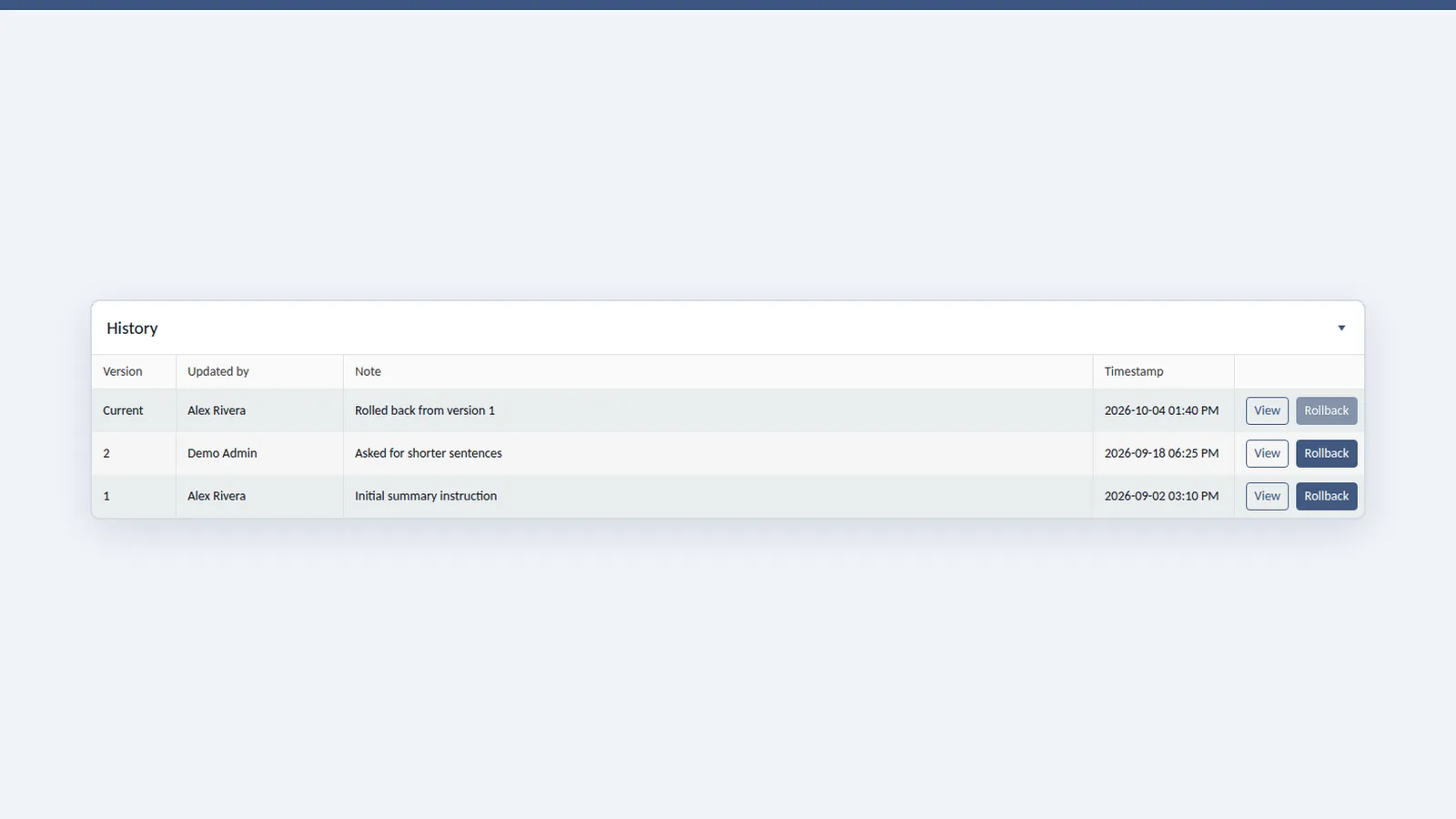
The options were to edit the prompt in place or to keep every version. I chose versions. Every save creates a new version that can’t be edited. A rollback deletes nothing: it copies an older version into a new one and notes the source. The cost is a slowly growing set of text records. In return, we get the complete, attributed history compliance buyers look for.
Make every change deliberate
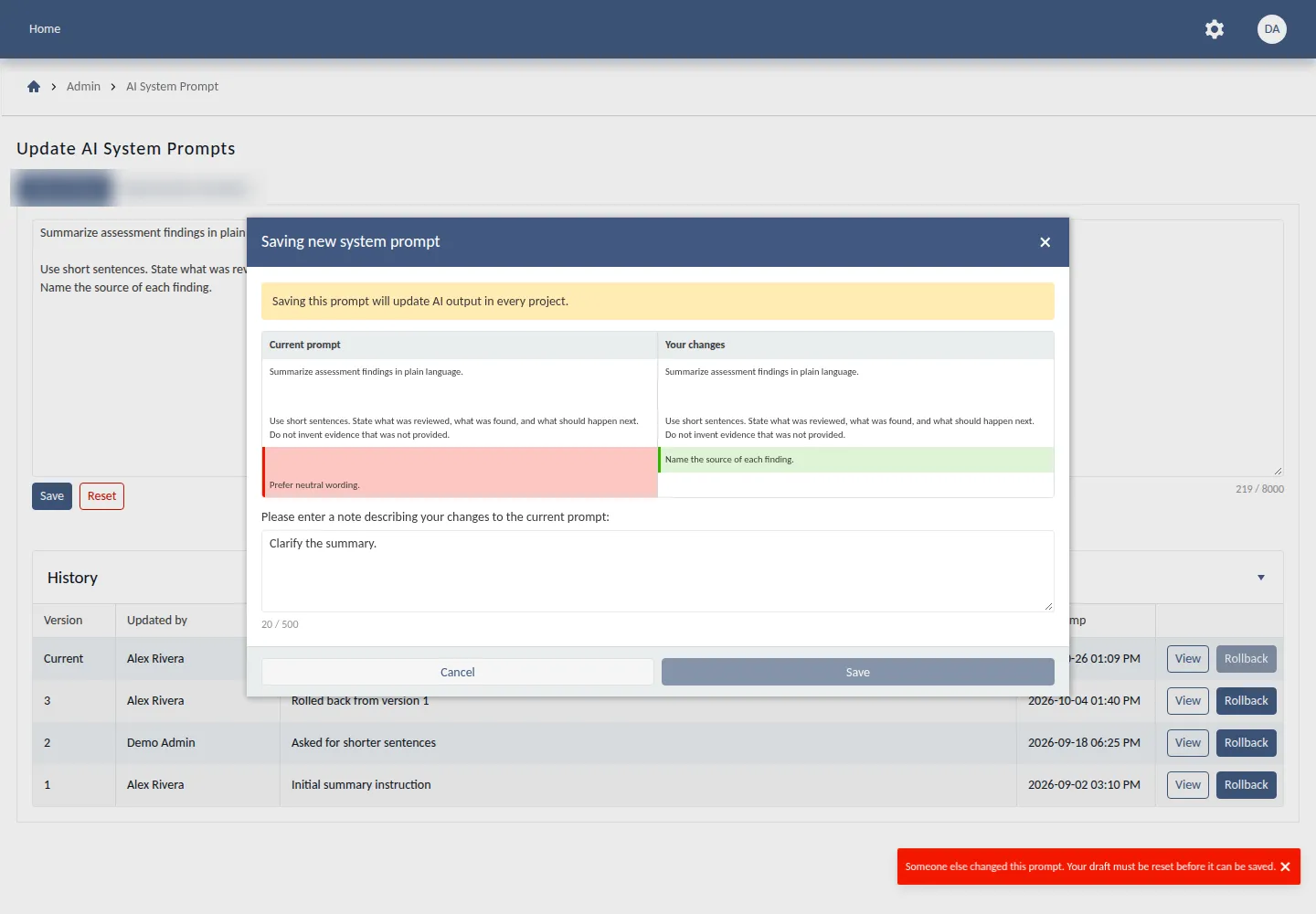
A prompt edit changes AI output across every project at once. A plain Save button would have been faster to use, but too easy to misuse, so I designed the save step to slow people down just enough. Before saving, the admin sees a side-by-side comparison of the current prompt and their changes, a warning that the change applies everywhere, and a required note explaining why. The note sits in the history next to their name, so the audit trail records the reason for each change, not just who made it and when.
Prevent silent overwrites
The AI first suggested locking the prompt while someone edits it. I chose a version check instead: each save carries the version it was based on, which kept the design simpler than a lock. If someone else saved first, Save is disabled and the admin is told to reset their draft, so nobody’s work is quietly lost. Writing a new version and making it active happen in one database transaction, so the system can never point at a version that doesn’t exist.
Keep the scope small enough to ship
Access goes to the app’s existing admins. A new permission flag would have added a concept nobody needed. Validation is simply “not empty, under 8,000 characters”. Only this one field is exempt from global sanitization, and every other input keeps its protection. Each cut removed something to build, test and explain later.
Privacy by default
Storing the author’s email was an option. I chose to store an ID and a display name, with no email. That answers “who changed this?” with less personal data to protect.
De-risk the rollout
Instead of a migration that seeds the first version on deploy, a hardcoded default prompt stays in place as a fallback until the first version is saved, so there was nothing to seed. Skipping the migration meant one less script to write, review and run against production, and the live prompt stayed the same until an admin chose to change it.
Bring the design back to existing patterns
I kept the API contract between the two codebases in step. Over two review rounds, I replaced the AI’s custom pieces with patterns the codebase already used. It passed the full backend suite of about 675 tests, including new tests for conflicts and rollbacks.
Result
- Senior assessors now tune the AI themselves. A prompt change went from an engineering request and a deploy to a save on an admin page.
- Every version records who saved it, when and why, and any version can be restored without losing history.
How I used AI to build it
AI coding agents wrote the first implementation and most of the tests. I set the rules: they never commit as themselves, never force-push, and never open or merge a pull request without my approval. They explain their reasoning before offering options, and every write call against a local server waits for my sign-off.
The first draft worked, but it overbuilt:
- It added a custom error helper and a custom access middleware where the codebase already had patterns for both, and it suggested a new permission flag when the existing admin check was enough.
- It checked for conflicts with a separate read before the write. I moved the check into the write itself, which made it atomic.
- It stored author emails we didn’t need, and it invented a 200-character minimum nobody had asked for.
- It proposed seeding the first version with a migration on deploy, and it suggested locking the prompt while someone edits it. I declined both.
I cut each one in review.
AI got me a working draft fast, and my job was making it the right one.
What’s next
The open product question is where the AI’s safety guardrails should live. Fixed in code, separate from the editable text, they can’t be weakened by accident. As part of the prompt, they give admins full control. That’s a governance decision about who should be trusted to change what, and I’m treating it as one.
Next time, I’d give the AI agents the codebase’s conventions and my non-negotiables up front instead of enforcing them in review. Most of my corrections were predictable, and writing them down first would likely have saved a review round.